
To use this feature, you must have a Company account. If you don’t have one yet, follow the steps here: How to Create a Company Account.
- Sign in to your account by selecting Sign In on the upper right part of the screen.

- From your account dashboard, select Company Users
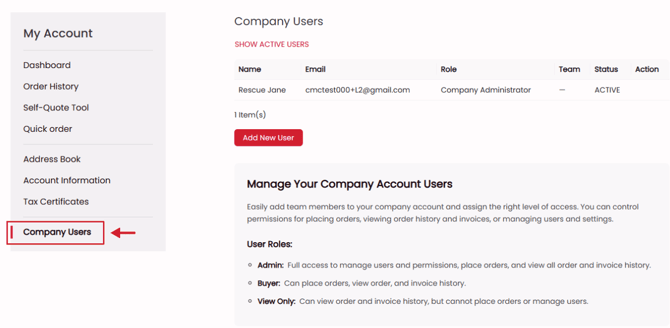
How to add users to your company account
Select the Add New User button.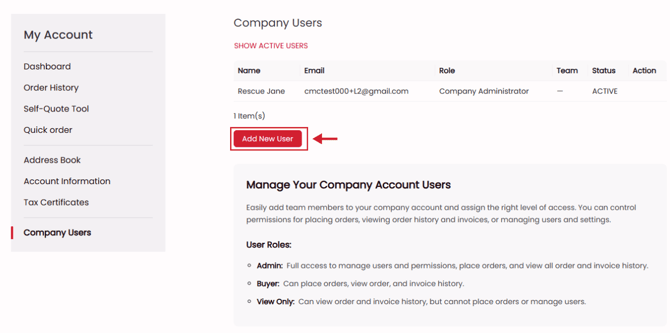
Fill in the new user information and select a User Role.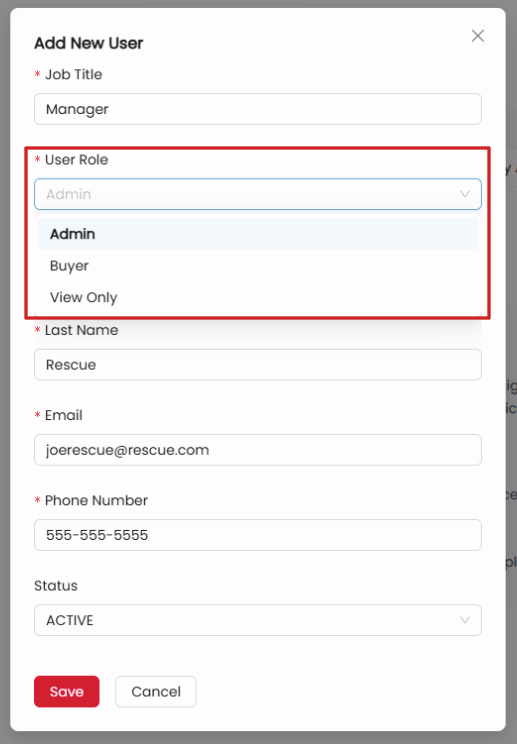
User Roles
-
Admin: Full access to manage users and permissions, place orders, and view all order and invoice history.
-
Buyer: Can place orders, view order, and invoice history.
-
View Only: Can view order and invoice history, but cannot place orders or manage users.
What if I want to add a user who is already a part of another company account?
-
Follow the same steps as above to add a user to your account.
-
The user will receive an email invitation to join your company.
- Once they except, they will be added to your company account.